



Industrial HMI All-In-One
- Mã sản phẩm: CM5-HMI-10.1A-ACCE (US) SKU 35724
- Nhà sản xuất: Waveshare
- Website hỗ trợ: https://www.proe.vn
0₫
Giá thị trường:
Wiki: docs.waveshare.com/CM5-HMI-7A-ACCE
Weight: 0.546 kg
CM5-HMI-7A-ACCE
- 7inch IPS optical bonding display x1
- CM5-IPC-BASE-B baseboard x1
- CM5-HMI-7A metal case x1
- CM5-IPC-BASE-B metal bracket x1
- 22PIN 0.5mm pitch FFC cable (2PCS) 170mm x1
- Antenna rubber plug 6mm x2
- 2PIN 3.5mm pitch screw terminal x1
- PH2.0 3PIN cable 15cm x1
- Power adapter cable 15cm x1
- PI5-HMI-080C mounting buckle (4PCS) x1
- 6PIN 3.5mm pitch double-layer terminal block (2PCS) x1
- OPTIONS 12V 4A power x1
- Pink thermal tapes x1
- Screwdriver x1
- Screws pack x1

CM5-HMI-8A-ACCE
- 8inch DSI LCD (D) optical bonding display x1
- CM5-IPC-BASE-B baseboard x1
- CM5-HMI-8A metal case x1
- CM5-IPC-BASE-B metal bracket x1
- 22PIN 0.5mm pitch FFC cable (2PCS) 170mm x1
- Antenna rubber plug 6mm x2
- 2PIN 3.5mm pitch screw terminal x1
- PH2.0 3PIN cable 15cm x1
- Power adapter cable 15cm x1
- PI5-HMI-080C mounting buckle (4PCS) x1
- 6PIN 3.5mm pitch double-layer terminal block (2PCS) x1
- OPTIONS 12V 4A power x1
- Pink thermal tapes x1
- Screwdriver x1
- Screws pack x1

CM5-HMI-10.1A-ACCE
- 10.1inch DSI LCD (D) optical bonding display x1
- CM5-IPC-BASE-B baseboard x1
- CM5-HMI-10.1A metal case x1
- CM5-IPC-BASE-B metal bracket x1
- 22PIN 0.5mm pitch FFC cable (2PCS) 170mm x1
- Antenna rubber plug 6mm x2
- 2PIN 3.5mm pitch screw terminal x1
- PH2.0 3PIN cable 15cm x1
- Power adapter cable 15cm x1
- PI5-HMI-080C mounting buckle (4PCS) x1
- 6PIN 3.5mm pitch double-layer terminal block (2PCS) x1
- OPTIONS 12V 4A power x1
- Pink thermal tapes x1
- Screwdriver x1
- Screws pack x1

Industrial HMI All-In-One Touch Display Development Board for Raspberry Pi Compute Module 5, 10-Point Touch, Optical bonding toughened glass panel, with 5MP front camera, supports RS485 Industrial Communication and 4G/5G Communication
HMI All-in-one Touch Display
for Compute Module 5
for Compute Module 5
High Resolution | 10-point Touch | Aluminum Alloy Case

- Size
 7" / 8" / 10.1"
 - Resolution
 720×1280/800×1280
 - Display Panel
 IPS panel
 - Viewing Angle
 170°/178°
 - Touch Type
 Capacitive
- Touch Points
 10-Point
 - Touch Panel
 Toughened Glass
 - Touch Panel Tech
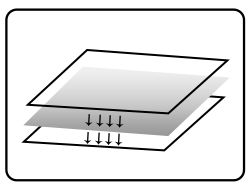 Optical Bonding
 - Camera
 5MP Front Camera
 - Display Interface
 HDMI Port / 4K Output
- Power Port
 Screw Terminal
 - Interfaces
 Multi-Function Interfaces
 - PLP
 Supercap PLP
 - Networking
 Multiple Networking
 - Enclosure
 Black Aluminum Alloy
Size Options

CM5-HMI-7A-ACCE
7inch, 170° viewing angle,
720 × 1280 resolution

CM5-HMI-8A-ACCE
8inch, 178° viewing angle,
800 × 1280 resolution

CM5-HMI-10.1A-ACCE
10.1inch, 178° viewing angle,
800 × 1280 resolution
Toughened Glass Panel
Sensitive touch control with High Resolution display, durable design

Onboard 5MP Front Camera
Accurate Face Recognition for Enhanced Security

10-Point Capacitive Touch

- up to 10-point touch, depending on the operating system
- Optical bonding, display well and dust-resistant
Adjustable brightness via software
Excellent heat dissipation
Full Metal Enclosure with efficient heat dissipation, Pure passive cooling,
no fan noise worries

Onboard Supercapacitor Module
Supports power-loss hold-up, data protection, and supercapacitor energy storage

VESA Mounting Support
Easily adaptable to various monitor arms, enjoy a flexible installation experience

* for reference only, the stand is NOT included, please refer to the package content
for detailed part list.
Interface Introduction

- Type-C port
for power supply, eMMC flashing, or USB OTG - HDMI port
supports 4K output - USB ports
2 × standard USB 2.0 port, 2 × USB 3.2 Gen1 port with up to 5Gbps rate - 1000M Ethernet RJ45 port
supports 10M / 100M / 1000M network connections - Nano SIM card slot
- TF card slot
for connecting a TF card with pre-burnt system (Lite variant ONLY)
- External antenna mounting holes
- PSW button
Long press to force power off, short press to soft power off or on - BOOT button
press before powering on to enter the burning mode - System function indicators
- Serial communication indicators
- Multi-function interfaces
expanded via GPIO - DC power supply screw terminal
supports DC 7V ~ 36V power supply
How to install


Step 1: Install the standoffs ① at the positions shown.

Step 2: Install the CM5 module on the back of baseboard, and attach the pink thermal tapes.

Step 3: Install the baseboard with the CM5 installed onto the bottom cover and secure it with the silver screws ②.

Step 4: Install the front and rear covers and secure them with the black screws ③, then install the antenna rubber plugs ⑤, and remove the sticker from the buzzer.

Step 5: Install the metal bracket onto the display and secure it with black screws ④.

Step 6: Connect the display FFC cables ⑥ and PH2.0 power cable ⑦ to the corresponding connectors on the baseboard as shown.

Step 7: After connecting the cables, install the host to the back of the display and secure it with the black screws ③.

Step 8: Install double-layer terminal blocks ⑨ and connect the power adapter cable ⑧.
* for reference only, please refer to the package content for detailed part list.
outline dimensions
7inch display

8inch display

10.1inch display


Điện tử ProE cung cấp linh kiện điện tử, thiết bị điện tử , linh kiện IoT chính hãng. ProE cung cấp dịch vụ đặt hàng linh kiện điện tử, thiết bị điện tử chính hãng theo yêu cầu cụ thể của khách hàng. Liên hệ : contact@proe.vn, SĐT: 0938946849
Website: www.proe.vn
Diễn đàn: https://www.facebook.com/groups/278263459284765/
Youtube Chanel: ProE Youtube
Facebook: ProE Facebook
Sản phẩm cùng loại


CM5-IO-WIRELESS-BASE
2.990.000₫

MYD-YA157C-V3 Development Board
6.500.000₫


CM5-DUAL-ETH-BOX-A (US)
2.500.000₫


Luckfox-Omni3576-04000-Box
Liên hệ


